
UI Design vs. UX Design: Why Your Website Needs Both
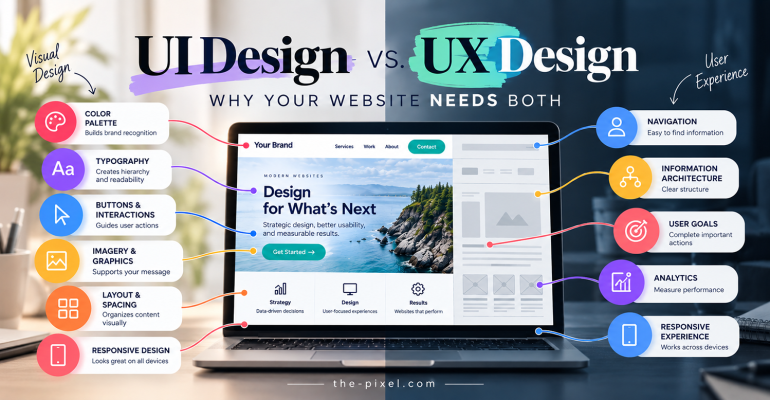
UI Design vs. UX Design: Why Your Website Needs Both
A professional-looking website can make a strong first impression, but appearance alone doesn’t determine whether visitors will stay, engage, or become customers. Understanding the difference between User Interface (UI) Design and User Experience (UX) Design can help businesses identify what’s working, what’s not, and whether their website actually needs a redesign.
What Is User Interface (UI) Design?
User Interface Design focuses on the visual and interactive elements people use when navigating a website. It establishes how information is presented, how components behave, and how the website communicates the business’s visual identity.
A well-designed user interface typically includes:
- Branding and Color Palette: Consistent use of primary, secondary, and supporting colors that reflect the business’s identity.
- Typography: Readable fonts, consistent heading styles, and a clear hierarchy between headings, subheadings, and body content.
- Buttons and Interactive Elements: Consistent button styles, hover effects, active states, and visual feedback.
- Graphics and Imagery: Relevant photography, illustrations, and icons that support the content.
- Layout and Spacing: Consistent padding, margins, alignment, and whitespace that help organize information.
- Responsive Design: Layouts that adapt to different screen sizes and devices.
Without an established visual identity, websites can develop inconsistent design patterns. Different button styles, competing colors, irregular spacing, and inconsistent typography can make the experience feel disconnected.
Visual consistency helps establish familiarity, professionalism, and trust. It also makes interactive elements easier for visitors to recognize as they move between pages.
However, even a visually consistent website can have usability problems.
What Is User Experience (UX) Design?
User Experience Design focuses on how people interact with a website and how effectively they can accomplish their goals.
While UI Design establishes the visual and interactive presentation, UX Design considers the complete experience, from arriving on the website to finding information, completing a task, or contacting the business.
For example, a business website might have an attractive homepage, professional photography, and consistent branding. But if visitors cannot locate service information, understand what the business offers, or find the contact form, the experience becomes frustrating.
UX Design examines questions such as:
- Can visitors find the information they’re looking for?
- Does the navigation structure make sense?
- Are important services and pages easy to discover?
- Does the website provide enough information to support customer decisions?
- Can visitors complete important actions without unnecessary steps?
- Does the website work effectively across desktop, tablet, and mobile devices?
Good UX Design reduces unnecessary friction between the visitor and their goal.
UI Design and UX Design are not competing disciplines. They work together to create websites that are visually consistent, accessible, understandable, and effective.
View UI Design vs UX Design infographic.
Building a Consistent User Interface Across Devices
Responsive UI Design ensures a website maintains visual consistency and usability across desktop computers, tablets, and smartphones.
Designers establish layout specifications, spacing systems, and responsive breakpoints to ensure content adapts appropriately to different screen sizes. Frameworks such as Bootstrap can provide a foundation for consistent grids, gutters, and spacing, while allowing customization based on the website’s content and design requirements.
However, responsive design goes beyond adjusting layouts.
Navigation menus, buttons, forms, typography, images, and content hierarchy must remain accessible and easy to use regardless of the device.
For example, a website may have a well-organized desktop navigation menu but become difficult to use when that navigation collapses into a mobile menu.
If visitors struggle to locate services, access dropdown menus, or complete a contact form on their smartphones, the website may have a responsive user experience problem rather than simply a visual design issue.
A consistent interface should support the same customer goals across devices, even when the layout and interactions change.
Website Navigation: Where UI and UX Work Together
Website navigation is one of the clearest examples of how UI and UX Design work together.
A typical business website header may include a company logo, primary navigation menu, contact button, phone number, or other important business information.
From a UI perspective, the navigation should have consistent typography, spacing, button styles, and visible interaction states.
Hover effects, active indicators, and dropdown animations can provide useful visual feedback. However, those interactions should remain accessible to visitors using touchscreens, keyboards, and assistive technologies.
From a UX perspective, the more important question is whether visitors understand the navigation.
Consider a business that places all its services under a generic menu label or organizes pages according to internal company departments.
That structure might make sense to employees but not to potential customers.
Visitors shouldn’t need to understand how a company operates internally to find the service they’re looking for.
A clearer navigation hierarchy might organize information around customer needs, including services, pricing, examples of completed work, frequently asked questions, and contact information.
The goal isn’t to add more navigation links. It’s to make important information easier to discover.
View UI Design vs UX Design infographic.
Your Website Might Not Need a Redesign. It Might Need a Better Experience.
One concern business owners have when their websites stop performing is the possibility of investing thousands of dollars into a complete redesign.
But what if the existing website already has a consistent brand identity, professional imagery, readable typography, and a responsive layout?
Before recommending a complete redesign, it’s worth investigating whether the underlying problem is related to the website’s structure, content, or usability.
For example, a website may look professional but have:
- Confusing navigation labels or poorly organized service pages.
- Important content buried several clicks into the website.
- Missing pricing or service information that customers need before making a decision.
- Unclear calls to action or difficult-to-complete contact forms.
- Outdated content that no longer reflects the business’s services.
- Important policy, support, or cancellation information that is difficult to locate.
These problems don’t necessarily require rebuilding the website.
In some cases, reorganizing the navigation, improving page content, simplifying forms, and clarifying calls to action can produce a more useful experience while preserving the existing visual design.
Other websites may require more substantial changes, especially when the interface is outdated, inaccessible, inconsistent, or technically difficult to maintain.
The important distinction is identifying the problem before deciding on the solution.
Use Website Analytics to Understand What’s Happening
How can you determine whether your website needs a visual redesign or improvements to the user experience?
Start by examining the available evidence.
Website analytics can reveal performance patterns that aren’t immediately apparent from looking at the design.
Before making significant website changes, businesses should review available performance data.
Tools such as Google Analytics 4 (GA4) and Google Search Console can help identify patterns in website traffic, engagement, search visibility, and visitor behavior.
If historical data is available, start by reviewing the previous six months and comparing that period with the same six months from the previous year.
Comparing equivalent periods can help account for seasonal changes in customer demand.
During this review, consider several questions:
- What changed? Has website traffic increased or decreased compared with the previous year?
- Are visitors engaging? Which pages attract attention, and where does engagement appear to decline?
- Are visitors finding the right content? Which service pages receive traffic, and which important pages are rarely visited?
- Are we losing search visibility? Have impressions, clicks, or search queries changed?
- Are visitors completing important actions? Are contact form submissions, phone clicks, and other conversions being measured?
- Are we missing information? Do visitors have enough content to understand the services and make informed decisions?
Google Analytics can reveal patterns in user activity, while Google Search Console provides information about how a website performs in Google Search.
However, analytics alone cannot explain every usability problem.
For example, a service page might receive substantial traffic but generate very few inquiries. That could indicate unclear messaging, weak calls to action, mismatched search intent, or another issue.
Additional research, such as usability testing, customer feedback, and behavioral observation, can help explain why visitors are struggling.
This combination of quantitative and qualitative research provides a stronger foundation for making website improvements.
View UI Design vs UX Design infographic.
Why Website Structure Matters More Than Many Businesses Realize
A website’s information architecture determines how pages, content, and navigation are organized.
When that structure is confusing, visitors may struggle to find information even when the interface looks professional.
Imagine a potential customer visiting a website to learn about service costs.
They navigate through the homepage, review the services menu, and search the About page but cannot find any pricing information or explanation of how projects are estimated.
The visitor may leave without contacting the business.
The issue isn’t necessarily the website’s colors, typography, or visual appearance. The information they needed wasn’t easy to find.
Depending on the business, useful supporting pages might include:
- Website Costs and Pricing
- How We Work
- Frequently Asked Questions
- Problems We Solve
- Terms of Service and Cancellation Policies
- Case Studies and Examples of Work
Not every business needs all these pages, and their presence alone won’t guarantee better performance.
The purpose is to make relevant information available when customers need it.
A well-organized website helps visitors understand what a business offers, how its services work, and what steps to take next.
Clear internal links and descriptive navigation can also help search engines discover and understand important content.
While website structure alone doesn’t guarantee higher search rankings, it supports usability, content discovery, and search engine accessibility.
Does Your Website Need UI Improvements, UX Improvements, or Both?
UI and UX improvements often overlap, but identifying the primary problem can help determine where to begin.
View UI Design vs UX Design infographic.
Consider UI Design Improvements When:
- Branding, colors, or typography are inconsistent.
- Buttons and interactive components look different across pages.
- The website feels visually outdated.
- Content is difficult to read because of poor contrast or spacing.
- Responsive layouts create visual problems on smaller screens.
Consider UX Design Improvements When:
- Visitors struggle to locate important information.
- Navigation labels or page categories are confusing.
- Contact forms are unnecessarily complicated.
- Important services are difficult to discover.
- Users abandon tasks before completing them.
- Website content doesn’t answer common customer questions.
Some problems require both disciplines.
For example, a poorly performing contact form might need a simpler sequence of fields, which is a UX improvement, along with clearer labels, error messages, and button states, which involve UI Design.
Likewise, a website navigation menu may need visual improvements to make interactive elements more recognizable, while its underlying page hierarchy may need to be reorganized around customer expectations.
The objective is not to determine which discipline is more important. It’s to identify the changes that will create a better experience.
How ThePixel Approaches UI and UX Design
At ThePixel, we believe website improvements should begin with understanding the business, its customers, and the problems that need to be solved.
That process may include reviewing existing analytics, evaluating website navigation, examining page structure, identifying usability concerns, and assessing the consistency of the current interface.
Rather than assuming every website needs a complete redesign, we look for opportunities to improve what already exists.
Sometimes that means refining a visual design system. Other times, it means restructuring navigation, improving content hierarchy, simplifying customer interactions, or redesigning specific pages.
When a complete redesign is appropriate, these findings help guide decisions about the new website’s structure and interface.
Our goal is to connect design decisions with measurable business objectives, whether that’s making information easier to find, improving customer engagement, or creating clearer opportunities for visitors to contact the business.
View UI Design vs UX Design infographic.
Final Thoughts: Better Website Design Starts With Understanding the Problem
A professional-looking website is important, but appearance alone doesn’t determine its effectiveness. UI Design creates the visual and interactive foundation, while UX Design helps visitors navigate information and accomplish their goals.
Before investing in a complete redesign, review your analytics, evaluate your navigation, and identify opportunities to improve the customer experience.
Sometimes a new design is necessary. Other times, improving the existing website’s structure, content, and usability can make a meaningful difference.
The best website isn’t simply the one that looks impressive. It’s the one that helps visitors accomplish their goals while supporting the goals of the business.
Not Sure Whether Your Website Needs a Redesign or UX Improvements?
Before investing in a new website, understand what’s working and what could be improved.
ThePixel helps businesses evaluate website usability, navigation, visual consistency, and conversion opportunities through UX audits and website design services.
Explore our UX Design & Audit Services or Contact ThePixel to discuss opportunities for improving your website.