
Managed Website Services
After Launch
Your website still needs someone responsible for it.
Launching a website is only the beginning. Hosting, security, software updates, backups, performance, content changes, and technical issues continue long after the project is complete.
ThePixel brings those responsibilities together so your website can stay healthy without your team having to coordinate multiple vendors or manage the technology themselves.
Ongoing website management protects the investment you've already made in your digital presence.
Reliable hosting, uptime monitoring, backups, and technical support help keep the website online.
Updates, compatibility checks, security monitoring, and maintenance help identify issues earlier.
Website changes, forms, documents, resources, and business information can continue evolving.
Performance, analytics, SEO, and customer behavior create opportunities for ongoing improvements.
Connected Website Management
Everything your website needs after launch.
Hosting, security, maintenance, performance, content support, and ongoing improvements work better when they are managed together.
Managed Hosting
Reliable hosting infrastructure, SSL, backups, uptime monitoring, performance configuration, and hosting support.
Security & Monitoring
Security oversight, malware monitoring, backups, and preventative maintenance help reduce avoidable problems.
Website Maintenance
WordPress core, plugin, and theme updates with compatibility checks and ongoing technical maintenance.
Performance Management
Caching, database maintenance, website health reviews, and performance improvements help keep the site responsive.
Content & Website Changes
Routine text, image, document, form, resource, and page updates without needing to manage WordPress internally.
Ongoing Optimization
Analytics, SEO recommendations, troubleshooting, and improvements help the website continue supporting the business.
Three Levels of Support
Choose how much of the website you want us to manage.
Every business needs a different level of support. Start with managed hosting, add preventative website care, or hand off ongoing website management to ThePixel.
Managed Hosting
ThePixel manages the hosting environment and core infrastructure behind your website.
- Managed hosting
- SSL configuration
- Daily backups
- Uptime monitoring
- Server security
- Performance configuration
Hosting + Website Care
Adds preventative maintenance, website-level monitoring, and technical care to managed hosting.
- Everything in Managed Hosting
- WordPress updates
- Plugin and theme updates
- Compatibility checks
- Security monitoring
- Website health reviews
Hosting + Website Management
ThePixel manages the website, routine changes, technical issues, and ongoing improvements.
- Everything in Website Care
- Routine content updates
- Form and document management
- Minor layout adjustments
- Analytics review
- SEO recommendations
Managed Website Packages
Choose the level of ongoing support your website needs.
Start with professionally managed hosting or add the preventative care, maintenance, content support, and ongoing website management your business needs.
Each level builds on the one before it, giving you a clear path from reliable hosting to complete website management.
Hosting Only
Managed Hosting
Reliable hosting for businesses that manage their own website updates but want ThePixel to manage the hosting environment.
- 15 GB website storage
- One WordPress website
- Managed hosting environment
- SSL certificate and configuration
- Daily website and database backups
- 30-day backup retention
- Uptime monitoring
- Server-level security
- Performance and caching
- Hosting-related technical support
Best for: Businesses that want professionally managed hosting but handle their own website updates.
Request This PlanHosting + Preventative Care
Hosting + Website Care
Managed hosting combined with preventative WordPress maintenance, security monitoring, and technical website care.
- 30 GB website storage
- Everything in Managed Hosting
- WordPress core updates
- Plugin and theme updates
- Compatibility checks
- Website security monitoring
- Malware scanning and alerts
- Database and performance maintenance
- Form and functionality checks
- Priority troubleshooting
- Quarterly website health review
Best for: Established businesses that want hosting and technical maintenance handled together.
Request This PlanComplete Ongoing Support
Hosting + Website Management
Complete hosting, maintenance, content support, troubleshooting, and ongoing website guidance.
- 50 GB website storage
- Everything in Website Care
- Routine text and image changes
- Staff, news, and resource updates
- Form and document management
- Minor page layout adjustments
- Website troubleshooting
- Analytics and performance review
- SEO and content recommendations
- Priority website support
- Ongoing improvement planning
Best for: Businesses that depend on their website and want one partner responsible for it.
Request This PlanStorage: Website storage includes website files and databases. Backups and email storage are managed separately.
Website Migration & Setup: Pricing is based on website size, email requirements, DNS configuration, testing, and technical complexity. Quoted separately.
Additional Project Services: Website redesigns, new webpages, custom development, integrations, extensive content creation, and major SEO projects are quoted separately.
Project Terms & Payment Details · Frequently Asked Questions · Service Level Agreement
Ideal For
Businesses that want their website taken care of.
Managed Website Services are designed for businesses that depend on their website but don't want to manage hosting, WordPress maintenance, security, troubleshooting, and ongoing website changes internally.
Why ThePixel
Senior experience. Direct responsibility.
Your hosting company shouldn't be pointing at your developer while your developer points at a plugin vendor.
ThePixel connects hosting, maintenance, website support, performance, content, analytics, and ongoing improvement so your business has one experienced partner responsible for the website.
One relationship for hosting, maintenance, support, troubleshooting, and ongoing website needs.
Monitoring and maintenance are designed to identify problems before they become larger disruptions.
The website can continue changing alongside your business instead of becoming outdated after launch.
Frequently Asked Questions
Managed Website Services FAQs
Common questions about hosting, website care, management, migrations, and ongoing support.
Can I purchase hosting without website maintenance?
Yes. Managed Hosting is available for businesses that want ThePixel to manage their hosting environment but prefer to handle WordPress updates and website changes themselves.
What is the difference between Website Care and Website Management?
Website Care focuses on technical health, including WordPress updates, security, compatibility, performance, and functionality. Website Management adds routine content changes, analytics, SEO guidance, troubleshooting, and continued improvements.
Can you migrate my website from its current host?
Yes. ThePixel can back up, migrate, test, and transition an existing website to the managed hosting environment. Migration and setup are quoted separately.
Will ThePixel manage my business email?
ThePixel can help configure email-related DNS records and provide deliverability guidance. In most cases, a dedicated business email provider is recommended while ThePixel manages the website hosting.
Will managed hosting make my website faster?
It can improve performance when moving from an overloaded or poorly configured environment. ThePixel also manages caching and performance fundamentals and can recommend additional improvements when needed.
Can I upgrade my plan later?
Yes. You can begin with Managed Hosting and move into Website Care or Website Management as your website and support requirements grow.
Connected Services
Your website should keep moving forward.
Managed Website Services connect naturally with website design, search visibility, analytics, strategy, and ongoing optimization.
Build a stronger website around your business, customers, content, and long-term growth.
Explore Service → 02 SEO & AI Search VisibilityStrengthen how customers discover your business across search engines and emerging AI search experiences.
Explore Service → 03 Digital Strategy & OptimizationUse analytics, UX, conversion strategy, and ongoing improvements to determine what should happen next.
Explore Service →Start a Conversation
Give your website an experienced team after launch.
Tell us about your website, current hosting, and ongoing support needs. We'll help identify the right level of managed service for your business.
Website Strategy / Information Architecture / Chiropractic
Chiropractic Website Strategy & Navigation
Creating clearer pathways between patient questions, conditions treated, and opportunities to request a consultation.
ThePixel redesigned Thrive Care's website in early 2026, bringing greater focus to patient needs, website hierarchy, and search-friendly content organization.
- Chiropractic Website Design
- UX & Digital Strategy
- SEO & Content Planning
01 / The Business Challenge
Patients need a clear path from questions to care.
People seeking chiropractic care may arrive with very different questions about pain, symptoms, treatment, and whether a clinic can help.
A navigation system built around the clinic alone may not match how patients research care.
The challenge was to make important patient information easier to discover while giving visitors a clear route toward contacting Thrive Care.
- Clarify pathways to conditions treated and care information
- Make consultation opportunities easy to recognize
- Support visitors arriving from organic search
- Build a flexible structure for future SEO content
02 / Information Architecture
Start with patient needs, questions, and content relationships.
Patient Questions
Understand what visitors need to know about chronic pain, symptoms, treatment, and care options.
Content Groups
Organize Conditions We Treat, care information, clinic details, and consultation opportunities.
Navigation Language
Use familiar, descriptive labels that help patients recognize relevant information.
03 / The Website Strategy
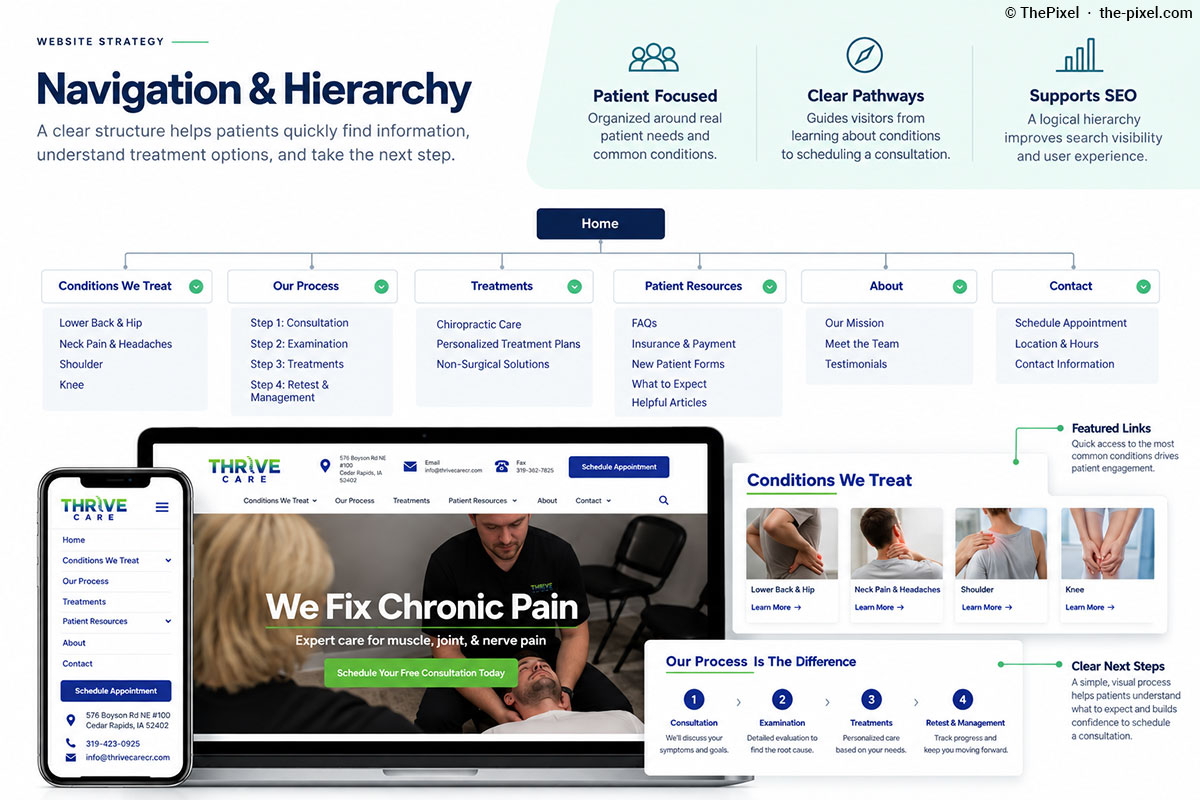
Organize the website around how patients look for care.
The website strategy prioritizes patient questions and organizes content around clear topics rather than requiring visitors to understand clinical terminology first.
The Conditions We Treat section provides a natural connection between symptom-related searches, educational content, and the next step toward a consultation.
- Organize treatment and condition information logically
- Use descriptive, patient-friendly navigation labels
- Connect related pages through contextual internal links
- Maintain visible consultation and contact actions
04 / UX & Content Decisions
Three decisions shaping the patient experience.
Prioritize Patient Pathways
Give patients clear routes to conditions, care information, and consultation details.
Build Consistent Page Patterns
Use recognizable layouts, headings, and next steps across treatment and informational pages.
Connect Related Content
Create internal links that help visitors move between symptoms, relevant information, and contact options.
05 / Patient Journey
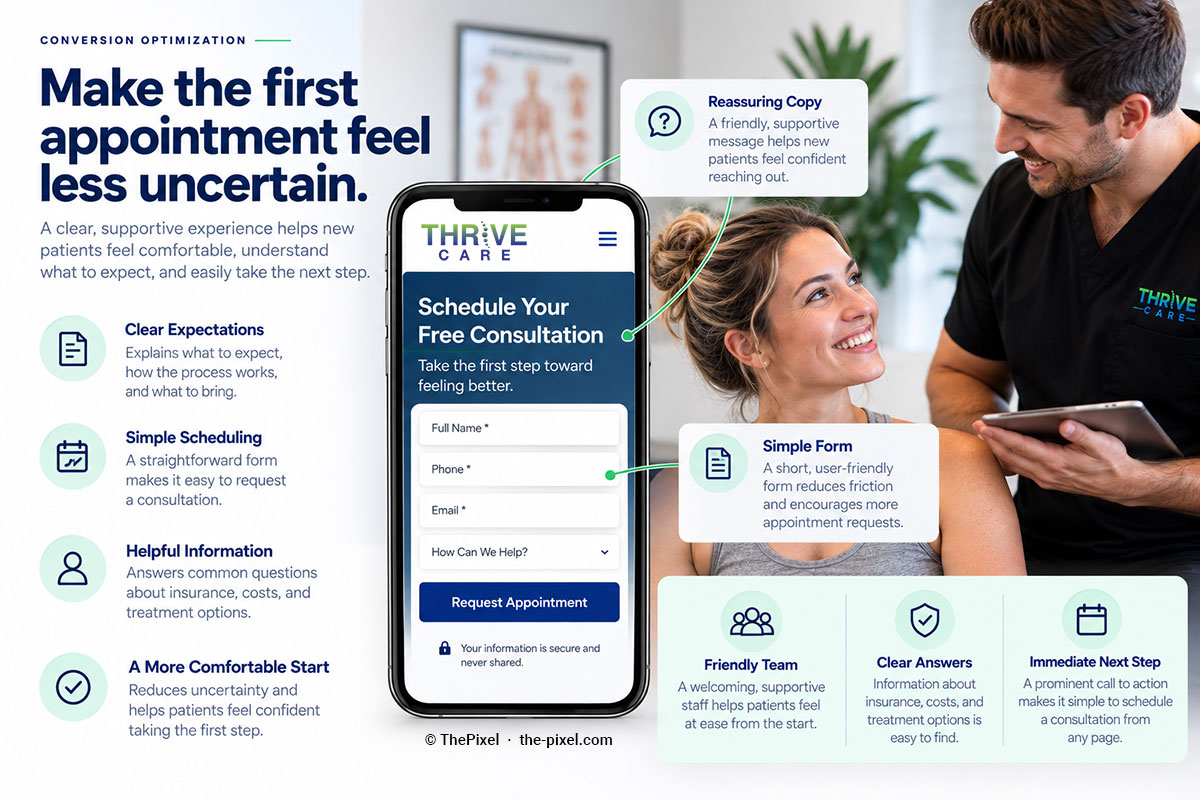
Connect patient questions to a clear next step.
A thoughtful patient journey helps visitors move from researching symptoms and conditions to understanding care options and requesting a consultation.
The website strategy connects relevant content through intuitive navigation, contextual links, and recognizable consultation actions.
- Discover relevant conditions and care information
- Explore treatment information with less friction
- Recognize clear consultation and contact pathways
06 / Navigation Experience
Make navigation understandable from the first click.
Effective navigation should make it obvious where patients can find information about their concerns.
Clear page titles, consistent menus, and contextual links help visitors move through the website without losing their place.
- Descriptive primary navigation labels
- Easy access to Conditions We Treat
- Consistent page headings and internal links
- Visible free consultation and contact pathways
07 / Interior Page Templates
Create familiar, patient-friendly content patterns.
Consistent interior-page layouts help patients scan content and recognize what to do next.
Condition-focused pages can follow a familiar structure while addressing the specific concerns of each audience.
08 / SEO & Content Discovery
Connect search intent with useful patient information.
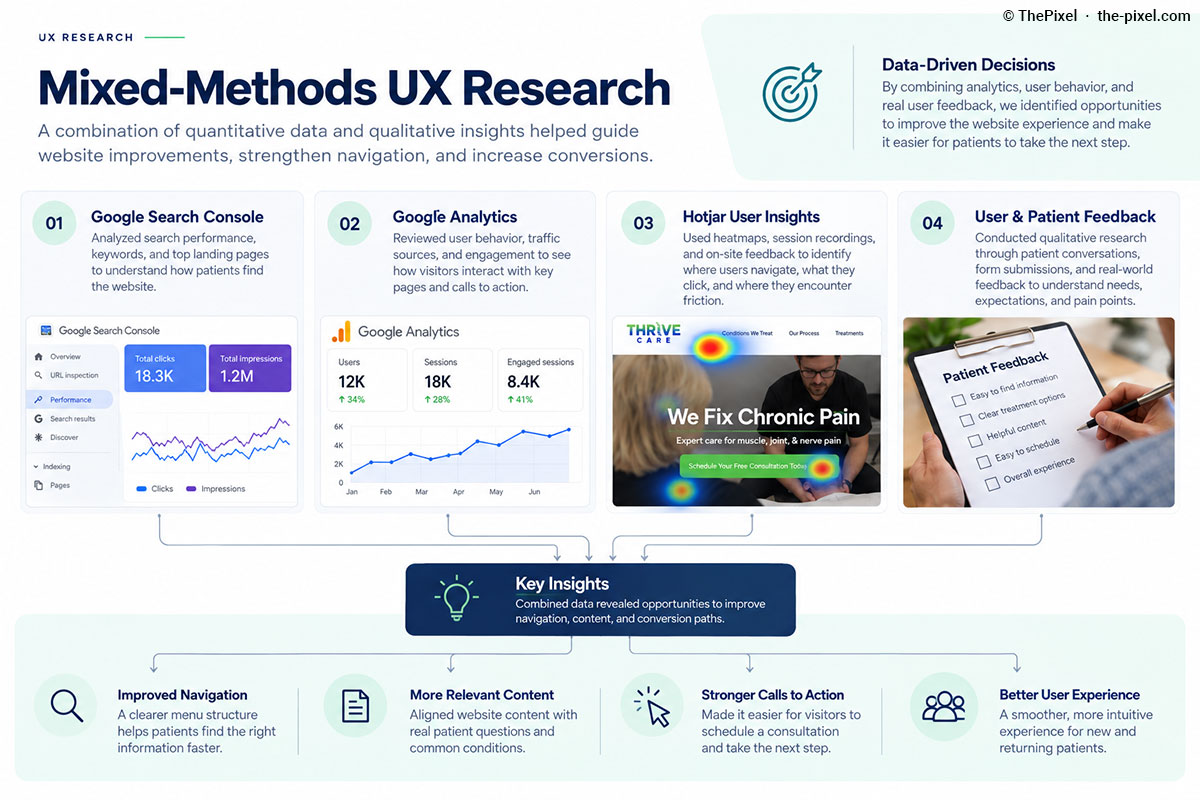
A useful website hierarchy also supports search engines in understanding the relationship between services, conditions, and local relevance.
Thrive Care's content strategy can use historical Google Search Console data to prioritize pages and search topics with demonstrated interest.
- Review existing search queries and landing-page performance
- Align page titles and headings with patient intent
- Link relevant conditions and care information
- Evaluate organic entry pages and consultation pathways
09 / Measurement & Optimization
Use qualitative and quantitative insights to improve the experience.
Search Discovery
Use Google Search Console to review queries, impressions, clicks, and landing-page performance.
Visitor Behavior
Use Google Analytics to study page engagement, navigation pathways, and tracked consultation actions.
Usability Feedback
Use Hotjar observations alongside qualitative feedback to identify friction and inform refinements.
Featured Case Study / Chiropractic
Explore the strategy behind Thrive Care's website redesign.
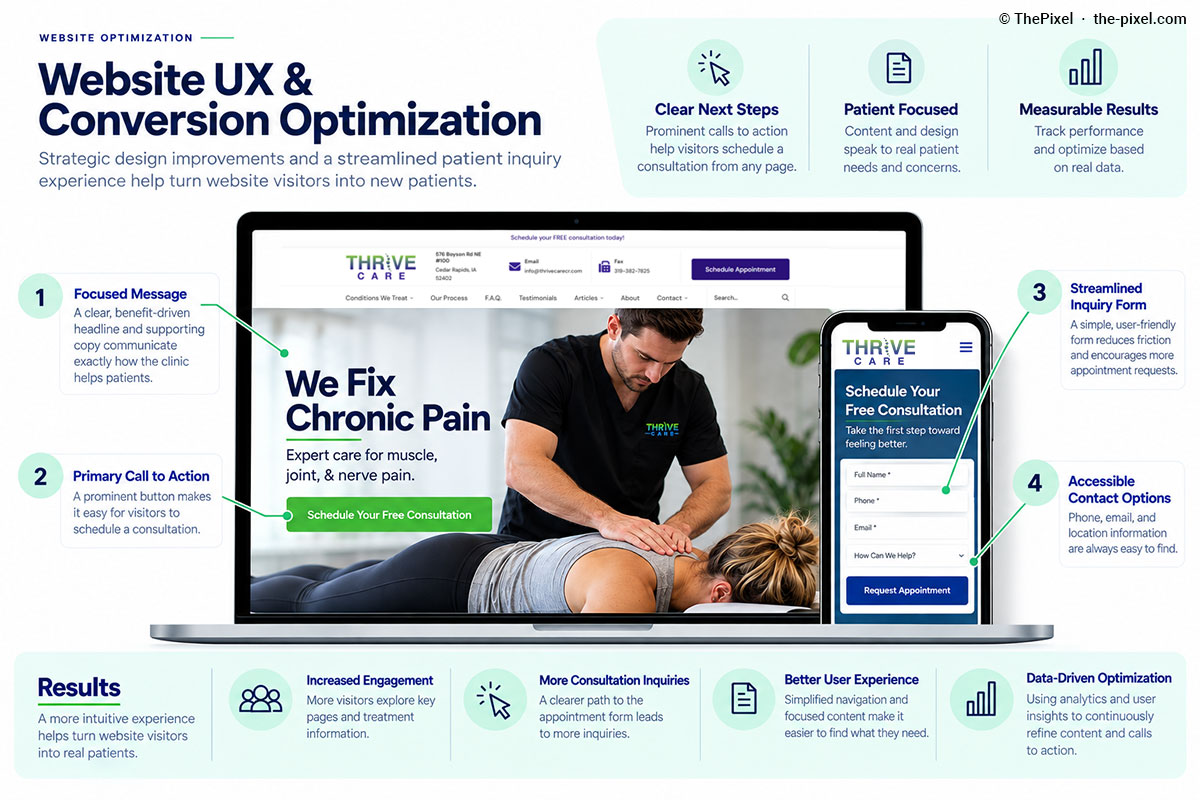
ThePixel redesigned Thrive Care's website to improve clarity, patient journeys, and the foundation for ongoing SEO and conversion improvements.
Explore how website strategy, UX design, WordPress development, and measurement fit together across the project.
- Patient-centered navigation and content hierarchy
- Chiropractic website UX and consultation pathways
- Search Console, Analytics, and Hotjar-informed improvements
Frequently Asked Questions
Questions about chiropractic website strategy.
Why is information architecture important for chiropractic websites?
It helps prospective patients find information about conditions, care options, and how to contact a clinic without having to guess where information is located.
How does website navigation support chiropractic SEO?
Clear page groups, descriptive labels, and contextual internal links help organize information for visitors and search engines.
How can patient navigation be evaluated?
Google Analytics can help evaluate journeys and tracked actions, Search Console can show organic discovery, and Hotjar and usability feedback can reveal points of friction.
Does the website redesign guarantee more consultations?
No. A clearer structure creates opportunities to improve the experience, but results should be measured with appropriate analytics and conversion tracking.
Website Strategy / UX Design / Chiropractic
Is your website helping patients find the information they need?
ThePixel helps healthcare and service businesses improve website clarity, navigation, patient journeys, and opportunities for meaningful inquiries.
Serving Dubuque, Cedar Rapids, Iowa City, Davenport, and businesses throughout Iowa.